Showing posts with label Glossy Accents. Show all posts

Monday, 17 December 2018

Mystery Project–Part 3–Turquoise Heart

For the second of the three hanging heart ornaments, I chose a turquoise and terracotta colour scheme. As I started making this, I decided to give it a suggestion of a Spanish theme, because the friend for whom I was making this one loves visiting Spain. I also wanted to make a more colourful, and perhaps more illustrative and pictorial, frame than for my other friend, the artist, for whom I made the brown frame.

This colour combination as a new one for me, and I was inspired by Zsuzsa of InkyDinkyDoodle blog – she uses a lot of these colours and I’ve always thought how lovely they were! Thanks, Zsuzsa. I’ve been meaning to try these colours for a while now.

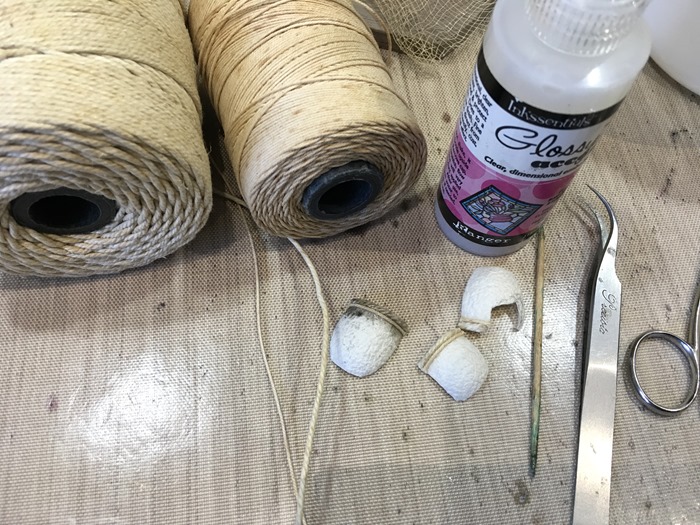
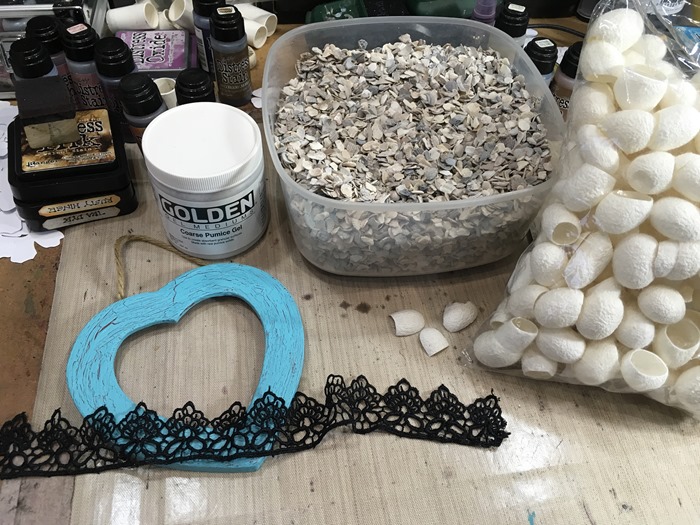
I began by getting out various bits and pieces in order to choose what to use for the various embellishments on this frame. I didn’t use the poultry grit (broken up bits of shell) in the end.

01 Possible Embellishments for Turquoise Heart

I decided I wanted to add a couple of small terracotta pots as embellishments, and knew I didn’t have any such ready-made embellishments in my stash, and slept on it for several nights, wondering how to achieve the look I wanted. When I started rummaging in my mixed media oddments box, I came across a bag of empty silk cocoons that I’d bought several years ago at a craft show, and thought, “Perfect!” Not only were they exactly the right size, but they also had just the right texture, too! I trimmed them down to shape so that I could stick them to the frame.

02 Making the Terracotta Pots

To create the top edge of the “pots,” I stuck down two different thicknesses of string. This proved to be a very fiddly job and I couldn’t get the string to stick at first, and then I tried doing it with Glossy Accents, which eventually worked. You can see that I have cut one of the little pots to look as if it was broken. They look a bit dirty around the top because the cocktail stick I used to help me stick on the string was a bit grubby! No matter – they were going to be painted anyway.

The first step was to paint them with gesso.

03 Gesso on Terracotta Pots

Now they were ready for painting with acrylics. I used Burnt Sienna and created shadows with Burnt Umber.

04 Painting the Terracotta Pots

On a scrap piece of watercolour paper which I’d cut to fit the recess in the frame, I painted a simple seascape and fixed it in place.

05 Background, Lace and Pumice Gel Medium

I cut a short length of black lace and stiffened it with some watered-down PVA glue and stuck this in place – reminiscent either of a Spanish mantilla or of the black wrought iron balconies so commonly seen in Southern Spain.

To create an impression of sand, I added some pumice gel medium and painted it with acrylics.

The frame was then ready for the rest of the embellishments.

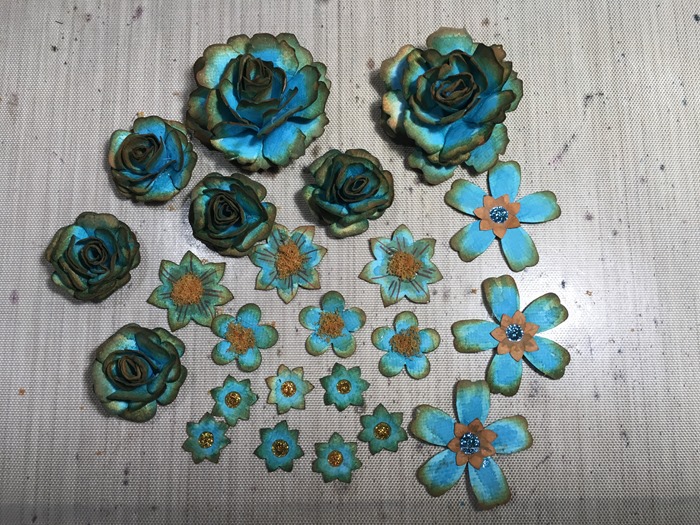
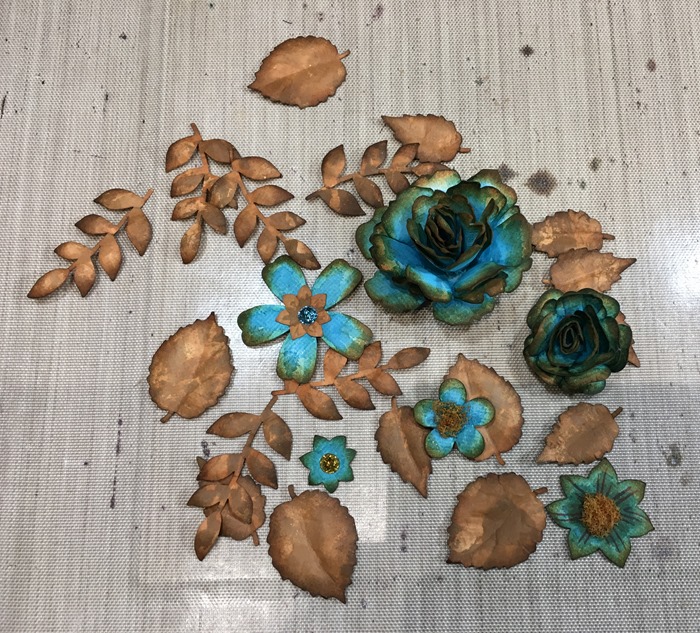
Here are the flowers and leaves I used.

44 All the Turquoise Flowers

48 Terracotta Leaves with Some Flowers

To stick the little pots in place, I filled the backs with hot glue and then stuck them in place with more hot glue.

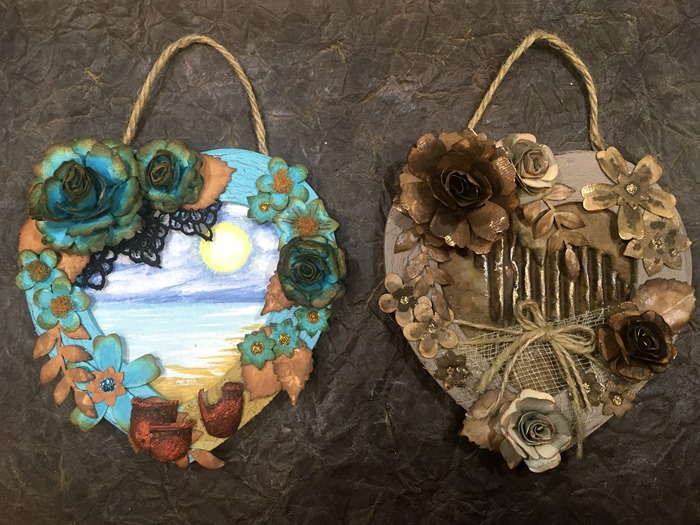
Here is the finished piece, with all the embellishments stuck down with hot glue.

06 Completed Turquoise Heart

I shall be giving my friend this little heart in the New Year when we are planning our lunch get-together which had to be postponed from before Christmas. She doesn’t visit my blog so I thought it would be safe to post about it before she receives it!

Here are the first two hanging hearts together. At this stage I hadn’t done more than the basic preparation on the third one.

06 Two Completed Hearts


Tuesday, 20 October 2015

Card Factory 2015–Two Bee Cards

First Two Bee Cards

My next collection of cards for the Card Factory is on the theme of bees. I have made two so far.

I began by inking up some backgrounds cut from offcuts of card from other projects in the Card Factory, using my new Fossilised Amber distress ink, smooshing and spritzing it on my craft sheet and dragging the card pieces through the wet ink. I always keep my offcuts in case I want to make something smaller with them – waste not, want not!!

01 Fossilised Amber Inked Backgrounds

First Card

The first card has a die-cut window with a bee in it, with its wings embellished with Glossy Accents.

I embossed one of the inked backround pieces, using a Fiskar’s texture plate in a honeycomb pattern, using my Cuttlebug.

02 Honeycomb Embossing with Fiskar's Texture Plate

It didn’t show up very much, so I inked over the top, using my brayer to apply Vintage Photo distress ink to the raised pattern, and then I distressed the edges with the same ink, using a home-made ink blending tool.

03 Inking Embossing with Brayer

I cut a window in the top, using one of my new Dorice circle dies. It was really funny about these dies. I ordered them some time ago on Ebay, and was told there was a fairly long delivery date on them. I was convinced I had received them, and couldn’t find them anywhere, and got very frustrated looking for them, turning the place upside down and wasting lots of energy in the effort! Then I got an email last week saying they’d been dispatched, and a few days ago, they arrived! Did I dream them? Anyway, I am glad they did eventually turn up, and I hadn’t lost them after all!

04 Cutting the Window with Circle Die

After cutting the window, I stamped my medium bee from Stampotique Originals onto another offcut of card, using sepia archival ink.

05 Stamping the Bee

I inked the background with more Fossilised Amber distress ink, using an Inkylicious Ink Duster.

06 Inking the Bee Background

Here is the window with the bee in it. I embellished its wings with Glossy Accents.

07 The Bee in the Window with Glossy Accents

I matted and layered the honeycomb piece onto some thin brown card with a slightly marbled effect, and then mounted it onto a white A5-folded-to-A6 sized piece of card which I had previously distressed around the edges with Fossilised Amber distress ink. Here is the card completed card.

08 Completed Card

The sentiment was stamped on another offcut of card, using one of my clear sentiment stamps that I got when I first started, and I’m afraid I don’t know the name of the set or the manufacturer. This small strip was matted onto the same brown card as the main part of the card, after I’d inked it with a little Fossilised Amber and distressed the edges with Vintage Photo distress inks.

Second Card

For the second card, I wanted to make a grid background, stamping with the tiny bee that came with the medium bee stamp I used for the first card. I worked out a suitable spacing for alternately spaced rows of bees and I’ve kept a note of this in the packet with the stamps so I can refer to it again. It took quite a while to work out, and then a little while longer to draw out on the background piece, but at least this way I get a nice even result, and it’s worth the trouble, I think.

I stamped the small bees using sepia archival ink, stamping right over the edges of the background piece to give a nice overall effect. You can see the grid lines I have drawn.

01 Stamping the Bees on the Grid

I took the circular piece of honeycomb that I saved from the first card after I’d cut the window, and inked the edges, and those of the background piece, with Fossilised Amber distress ink, using my home-made ink blending tool.

02 Stamped Bees on Inked Background

I stamped the circular piece using the medium bee stamp, and heat-embossed it in gold. I made another sentiment strip the same as for the first card.

As before, I distressed the edges of the A5-folded-to-A6 white card base with Fossilised Amber distress ink, and assembled the card.

03 Completyed Card

I have got several more background pieces inked and ready to be made up into more bee cards for this set.

Friday, 5 December 2014

Recycled Mini-Album Pages–Clocks

This post is about the penultimate page of the mini-album, and deals with one of my dad’s most absorbing interests.

He was a keen and expert horologist. He collected many clocks during his life, and was a skilled clock repairer. Over the years he amassed a comprehensive set of tools for this purpose, including a watchmaker’s lathe to complement his larger engineering lathe. He was always sketching on scraps of paper – ideas for repairs, clock movements, etc. This album would not be complete without some pages on his passion for clocks.

I recently acquired a gearwheels stencil, an “ArtMask” from Carabelle Studio, called “Rouages Steampunk.” Strictly speaking, it is a mask rather than a stencil, because it is the background that is cut away. I tried to make a gearwheels stencil once, with the gearwheels, rather than the background, cut out, and it all fell apart and I ended up with a fine collection of acetate gearwheels! (I am using them as masks, and for sticking onto projects, so they are not wasted.) Anyway, in this case, I wanted the actual gearwheels to be gold, and the background to remain black, so I did a bit of reverse stencilling. To do this, I first painted the whole page with metallic gold acrylic paint, and while it was still wet, I laid the mask on top and secured it top and bottom with some masking tape. I then wiped away the gold paint through the holes in the mask. To start with I used a baby wipe, but this was too wet and it spoilt the design underneath, so I had to wipe off all the gold paint and start again. A piece of kitchen paper wasn’t sufficient for paint removal, so I took a fresh baby wipe and wrapped it in kitchen paper and used that, which was better. For the second page, I dried a fresh baby wipe slightly with my heat gun, and the results were fine.

131 Clocks Page Background

I am pleased with the metallic finish on this background.

The next step was to lay down some images as the next layer of background – a scanned image of a diagram of a clock escapement, and some photos of various clocks my dad repaired. I decided to fussy-cut the background away and lay them down so that the background would show through.

132 Fussy Cutting the Images for 1st Clocks Page

Here is the first clock page complete, with the addition of photos and embellishments, and the trademark white border. The images in this case were laid down with soft gloss gel medium, so as not to interfere with the reflective surface of the gold background. The clock face was a cut-out, which I had distressed and kept for another project – it had been in my stash for some time.

133 1st Clock Page Complete

The first photo I chose was of some clock parts my dad made from scratch, to replace some worn ones in a clock he was repairing. He would always try to reproduce as faithfully as possible any clock parts he replaced, to be in keeping with the period – for instance, adding metric threads, or modern gears in an antique clock would be an anachronism, which would have offended him, not to mention reducing the value of the clock. Next to this photo is a picture of my dad’s little repair notebook, packed with his tiny, almost illegible writing! (He was a doctor, after all…) In this book he kept a record of all the repairs he carried out on people’s clocks, and could refer back to this, the next time a clock became an inpatient in the clock hospital. At the bottom is a photo of a church clock movement he repaired.

134 Clocks Title Detail

In the above detail shot of the title, you can see one of the Friendly Plastic gearwheels I made several years ago, with added gilding wax and Glossy Accents (neither of which shows up very well on this photo). This was stuck down with Pinflair glue.

The next photo shows the second clock page with the photos added. A bit more of the gold gearwheels background is left exposed in this one, but there is a fussy-cut clock movement laid over the left-hand page. On the right hand page you can see a photo of one of Dad’s antique clocks – his oldest one, a 17th century Cromwellian clock that my grandfather picked up cheap in a sale “because it’s only got one hand,” when they were made with only one hand!

135 2nd Clock Page with Photos

With the addition of borders and some text, the page is complete. You can see the tag puller on the right – more details about the tag below.

136 2nd Clock Page Complete

A couple of detail shots of this page. First, the top of the page, showing the gearwheels border I created, and the blue-painted clock movement (another church clock that he repaired) overlaid.

137 2nd Clock Page Top Detail

At the bottom of the page are photos of two models of different types of clock escapement that Dad made from perspex. He used these on an overhead projector to illustrate the difference, during his lecture “The Clock Doc – or Horology in a Nutshell,” his presidential address at his local medical society. Typical of Dad, he spent many hours making these models, and they were up on the screen for only a few minutes. They are now in my possession.

138 2nd Clock Page Bottom Detail

Preparing to make the tag. You can see the semi-circular shape I have punched out, and the printed clock face image ready to be punched out with the same punch.

139 Making Clock Puller for Final Tag

The clock face tag puller attached to the tag.

140 Clock Puller for Final Tag Complete

The tag in situ, showing how the tag puller fits exactly into the semi-circular hole.

141 Tag with Clock Puller in Situ

Because the two pages glued together to form the tag holder came at the end of the clock section, the reverse of the tag is different. Here you can see the stamp I used – one from the Stamp Attack Butterfly Doodle Dallions set.

142 Materials for Flower Puller for Final Tag

I used some Cosmic Shimmer Lapis Cobalt Aurora fine embossing powder to stamp the image, and then three different Perfect Pearls (Plum, Kiwi and Turquoise) applied like watercolours to colour the image. After this I punched out the shape.

143 Making Flower Puller for Final Tag

To complete the tag puller, I distressed the edges with Black Soot distress ink.

144 Flower Puller for Final Tag

Here is the reverse of the tag, with the flower tag puller attached.

145 Flower Puller on Final Tag

This picture shows the tag in place, with the flower tag puller nesting into the semi-circular hole.

146 Tag with Flower Puller in Situ

The background and border on the clock side of the tag. I used an Artistic Stamper stamp for the background (“Cogs”), stamping with Versamark, and adding some Cappuccino Perfect Pearls with a soft brush.

147 Background and Border for Clock Tag

Here is the completed clock side of the tag, with some journaling with my white marker pen.

148 Clock Tag Complete

Here is the reverse side of the tag, completed. As this lines up with the final page of the book, I decided to make this one a summary of all my dad’s qualities and accomplishments as celebrated throughout the book.

149 Final Tag Complete

All that remains to be done on the book now is the final double-page spread, and then a couple of pages of information about how the book was constructed and embellished. If there is room, I shall add a couple of blank pages at the back for notes and further photos.

Monday, 5 May 2014

Stampin’ Up Six-Sided Sampler Card 1–New Home

Today I made a New Home card, using for the first time my Stampin’ Up Six Sided Sampler stamps and co-ordinating punch.

Here are the materials and equipment I used to make the card.

01 Materials and Equipment

Working from top left: Stampin’ Up Hexagon punch, Stampin’ Up Six-Sided Sampler stamps, Water Droplets stamp from Designs by Ryn, Fiskar’s embossing plate (honeycomb) (behind the stamps), Scotch Quick Dry Adhesive, black acrylic paint, selection of clear sentiment stamps (manufacturer unknown, stored in CD case), alphabet stamp set in wooden box, Pinflair glue, Glossy Accents, home-made ink blender pad, Inkylicious Ink Dusters resting on clear embossing powder, Ranger Archival Ink (sepia), Wild Honey and Walnut Stain Distress Inks, Versamark embossing ink pad, foam pads, selection of pens, embossing tool. I don’t think I’ve left anything out!

The foundation for this card is an A4 smooshed background from my backgrounds folder, created by smooshing the paper around in spritzed ink on my non-stick craft sheet.

02 Smooshed Background

This was embossed using a Fiskars embossing plate – I bought a whole set of these several years ago on Ebay. They are rigid plastic, double-sided, with a different design on each side. I have used this honeycomb one more than all the others.

03 Cuttlebug Embossing Sandwich

In the above photo you can see the Cuttlebug sandwich needed to emboss the maximum size with this plate. Starting from the bottom: A Plate, Fiskar’s plate (right side up), cardstock (wrong side up), “No More Shims” embossing mat (thicker than the standard Cuttlebug tan mat), 2 sheets of scrap printer card, B Plate.

This is what the background sheet looks like after being passed through the Cuttlebug. The Fiskar’s plate embosses a maximum of 5” square. At the top of the sheet it is not embossed, and you can see the impressions left by the holes in the embossing plate. I put the sheet on the tan embossing mat and smoothed these out using my bone folder.

04 Embossed Background

Here is the background sheet trimmed to size, and resting on the base card which has yet to be inked.

05 Embossed Background on Base Card

There was a slight impression left by the edge of the plate, between the embossed part and the non-embossed, and I created an embossed line to cover this, using my Scor-Pal scoring board. This doesn’t show up very well in the photo, I’m afraid.

Using Wild Honey Distress Ink, I stamped a series of hexagons onto the background sheet, from the Stampin’ Up set. (The embossed line shows up a bit better on this photo.)

06 Hexagon Stamping

On a piece of pale yellow scrap card, I selected another hexagon stamp from the set, and stamped three shapes with Versamark, and then heat embossed them with clear embossing powder to act as a resist. This had the effect of darkening the yellow colour.

07 Heat Embossed Hexagons

I inked them with Wild Honey Distress Ink, using an Inkylicious Ink duster, deliberately keeping the colour uneven and random.

08 Inking the Heat Embossed Hexagons

These hexagons were then punched out with Stampin’ Up’s co-ordinating hexagon punch.

09 Punching the Heat Embossed Hexagons

After this, I used one of my home-made blending pads made from an old wood block from when I unmounted my original rubber stamps, and some cut-n’ dry foam. I used Walnut Stain Distress Ink to darken the edges.

10 Inking the Punched Hexagons

I was about to put the remains of the yellow card away, when it occurred to me that I could use the punched out shapes as a stencil to add dimension to the background sheet. (To the right, you can see the list I made, of the steps to create the card – useful for composing this blog post!)

11 Stencilling

I used Wild Honey Distress Ink with an Ink Duster to add some random hexagons.

12 More Stencilling

To create a mask over the stamped hexagons, I laid down some greaseproof paper and traced around the edges of the hexagons.

13 Preparing the Mask

I then cut around the traced line and held the mask down with a couple of small pieces of low tack masking tape.

14 Cutting the Mask

This is the water droplets stamp from the backgrounds set by Designs by Ryn – one of my favourite stamps as it creates the most realistic three-dimensional water droplets!

15 Water Droplets Stamp

For this card, I used sepia archival ink over the background, to simulate droplets of honey.

16 Stamping Over the Mask

When I use this stamp, I accentuate the realistic effect by adding a tiny dot with a white marker onto the catch-light of each droplet.

17 Highlighting the Catchlights

To create the main embellishment for the card, I drew a honeybee, and then outlined it with a black permanent marker pen (one of my Zentangle pens) and used the fine one to create the veins in the wings. To add colour, I rubbed my Wild Honey and Walnut Stain Distress Ink pads onto my non-stick craft sheet, spritzed them with water and picked up the ink with a brush, and painted the bee.

18 Painting the Bee

(I picked up the excess ink by smooshing the yellow card stencil piece in the ink – another useful addition to my backgrounds folder.) After a quick blast with my heat gun to make sure it was completely dry, I cut out the bee with a pair of fine scissors, and painted the edge of the cut card with black acrylic paint.

19 Painting the Edges of the Cut-Out Bee

Turning the bee over onto a piece of fun foam, I embossed the body with my large-sized embossing tool.

20 Embossing the Bee

The wings were painted with Glossy Accents and the bee left to dry.

21 Glossy Accents on Bee's Wings

While it was drying, I attached the three punched and heat-embossed hexagons onto the background using foam pads.

22 Mounting the Punched Hexagons on Foam Pads

I inked the edges of the base card with Walnut Stain and Wild Honey Distress Inks, using an Inkylicious Ink Duster. I put a piece of scrap paper inside the folded card to protect it from any misplaced ink.

23 Inking the Base Card

The card mounted onto the base card, with the sentiment stamped.

24 Sentiment

I used one of a set of clear sentiment stamps, a small amount of hand writing, and my alphabet stamps from the little wooden box – a set I got on Ebay – stamped with the aid of my stamp alignment tool. I used Wild Honey Distress Ink for the stamping, and then accentuated the text with my sepia permanent marker.

The completed card.

25 Finished Card

The bee was attached using quite a large amount of Pinflair glue filling the embossed body, with some more under each wing to keep them raised above the surface of the card. The legs were stuck down using Scotch Quick Dry Adhesive. Both glues were applied with the aid of cocktail sticks, and the card set aside overnight to dry.

The impression I was trying to create is of the new home owner approaching her new home – in this case, her very first home of her own. Her first sight of it is definite and clear, and as she moves forward in time, things become less clear, but there is the promise of sweetness and joy as her life moves forward, into who knows what adventures! Onwards and upwards to a bright future full of hope!

Related Posts Plugin for WordPress, Blogger...